 Image Effects
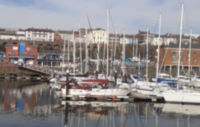
A normal picture with no effects
Adjust Brightness and Contrast
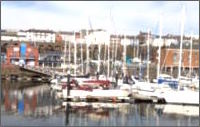
Brightness=30 and Contrast=30
Private Function Effect_BrightnessContrast(bmp As Bitmap, brightnessLevel1 As Integer, contrastLevel1 As Integer) As Bitmap
 ' brightnessLevel1 -255 to 255
 ' contrastLevel1 -100 to 100
 Dim effect1 As New Imaging.Effects.BrightnessContrastEffect(brightnessLevel1, contrastLevel1)
 bmp.ApplyEffect(effect1)
 Return bmp
End Function
Blurring a Picture
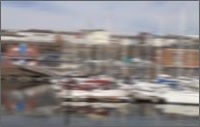
radius=5 and expand-edge=FALSE
Private Function Effect_Blur(bmp As Bitmap, radius1 As Single, expandedge1 As Boolean) As Bitmap
 ' radius 0 to 255 (255 = extremely blurry)
 ' expandEdge = True or False (expands bitmap and blurs into expanded region)
 Dim effect1 As New Imaging.Effects.BlurEffect(radius1, expandedge1)
 bmp.ApplyEffect(effect1)
 Return bmp
End Function
Adjusting Colour Balance
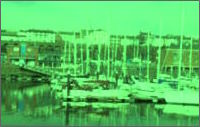
cyanRed=-40 magentaGreen=50 yellowBlue=-30
Private Function Effect_ColourBalance(bmp As Bitmap, cyanRed1 As Integer, magentaGreen1 As Integer, yellowBlue1 As Integer) As Bitmap
 ' all properties -100 to 100
 ' 1st colour decreases between -100 and 0
 ' 2nd colour increases between 0 and 100
 Dim effect1 As New Imaging.Effects.ColorBalanceEffect(cyanRed1, magentaGreen1, yellowBlue1)
 bmp.ApplyEffect(effect1)
 Return bmp
End Function
Black and White Photograph
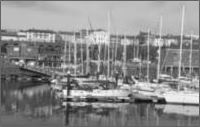
Private Function Effect_GreyScale(bmp As Bitmap) As Bitmap
 Dim gse As New Imaging.Effects.GrayScaleEffect
 Dim grayScaleMatrix As ColorMatrix = gse.Matrix
 Dim attributes As New System.Drawing.Imaging.ImageAttributes()
 attributes.SetColorMatrix(grayScaleMatrix)
 Using g As Graphics = Graphics.FromImage(bmp)
  g.DrawImage(bmp, New Rectangle(0, 0, bmp.Width, bmp.Height), 0, 0, bmp.Width, bmp.Height, GraphicsUnit.Pixel, attributes)
 End Using
 Return bmp
End Function
Photographic Negative
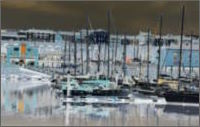
Private Function Effect_Invert(bmp As Bitmap) As Bitmap
 Dim ie As New Imaging.Effects.InvertEffect
 Dim grayScaleMatrix As ColorMatrix = ie.Matrix
 Dim attributes As New System.Drawing.Imaging.ImageAttributes()
 attributes.SetColorMatrix(grayScaleMatrix)
 Using g As Graphics = Graphics.FromImage(bmp)
  g.DrawImage(bmp, New Rectangle(0, 0, bmp.Width, bmp.Height), 0, 0, bmp.Width, bmp.Height, GraphicsUnit.Pixel, attributes)
 End Using
 Return bmp
End Function
Old Sepia Photograph
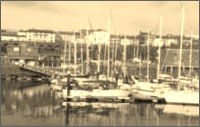
Private Function Effect_Sepia(bmp As Bitmap) As Bitmap
 Dim se As New Imaging.Effects.SepiaEffect
 Dim sepiaMatrix As ColorMatrix = se.Matrix
 Dim attributes As New System.Drawing.Imaging.ImageAttributes()
 attributes.SetColorMatrix(sepiaMatrix)
 Using g As Graphics = Graphics.FromImage(bmp)
  g.DrawImage(bmp, New Rectangle(0, 0, bmp.Width, bmp.Height), 0, 0, bmp.Width, bmp.Height, GraphicsUnit.Pixel, attributes)
 End Using
 Return bmp
End Function
Sharpen a Picture
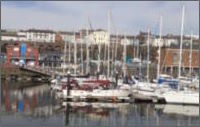
radius=45 and amount=10
Private Function Effect_Sharpen(bmp As Bitmap, radius1 As Single, amount1 As Single) As Bitmap
 ' radius 0 to 255 .. increasing number of pixels (not to scale) used for each pixel calculation
 ' amount 0 to 100 .. 0=no sharpenning 100=max sharpenning
 Dim effect1 As New Imaging.Effects.SharpenEffect(radius1, amount1)
 bmp.ApplyEffect(effect1)
 Return bmp
End Function
Colour Tinting a Picture
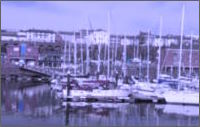
colour=Color.Blue and amount=50
Private Function Effect_Tint(bmp As Bitmap, colour1 As Color, amount1 As Integer) As Bitmap
 ' colour1  the colour used as a base for tinting
 ' amount1 -100 to 100 how much "hue" (colour1 tint) to apply
 Dim effect1 As New Imaging.Effects.TintEffect(colour1, amount1)
 bmp.ApplyEffect(effect1)
 Return bmp
End Function
Make Vivid Effect
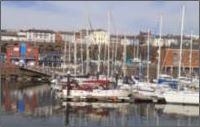
Private Function Effect_Vivid(bmp As Bitmap) As Bitmap
 Dim effect1 As New Imaging.Effects.VividEffect()
 bmp.ApplyEffect(effect1)
 Return bmp
End Function
DigitalDan.co.uk